
We all want the peace of mind that comes with being able to check on our homes, pets, or sleeping babies while we are away. But do you really need to spend $200+ on a Google Nest or Ring camera just to see if the dog is chewing the sofa? The market is filled with budget options, but many of them are unreliable, grainy, or impossible to set up.
That is where the Wansview 1080P Wireless IP Camera (Model Q5) comes in. It promises 1080P HD video, full room coverage with Pan/Tilt, and Alexa integration—all for the price of a few fancy coffees. But is it too good to be true? I bought one to test as a pet monitor and nanny cam to see if this budget contender can actually hold its own against the big brands.

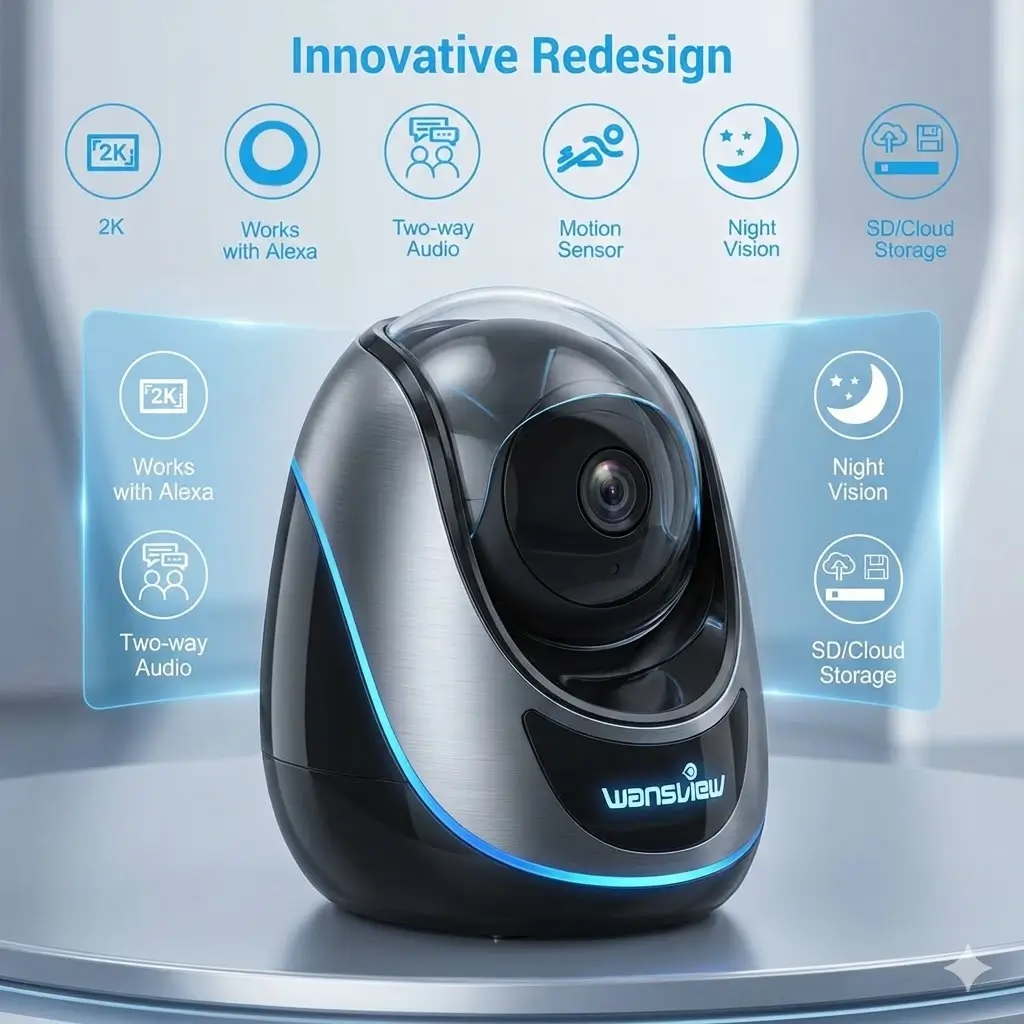
- High 2K WiFi IP Camera: With 2K resolution, wansview home camera displays a crystal clear smooth live video, you can kee…
- Two-way Audio & Works with Alexa: Built-in microphone & speaker offer to communicate with your loved ones when you are o…
- Smart Pan/Tilt & Crystal Night Vision: 105° wide-angle enhanced lens combined with 320° horizontal & 80° vertical rotati…
Quick Specs & Verdict
| Resolution | 1080P Full HD |
| Field of View | 320° Pan / 80° Tilt (360° Coverage) |
| Night Vision | Up to 16ft (Invisible 940nm LEDs) |
| Storage | Micro SD Card (up to 128GB) & Cloud |
| Smart Home | Works with Amazon Alexa |
| My Rating | ⭐⭐⭐⭐ (4/5) |
Verdict: For the price, the Wansview Q5 is unbeatable. It lacks the polish of premium brands, but for checking on pets or babies without a monthly subscription, it is the best value-for-money camera on the market.
1. Unboxing & First Impressions
The Wansview camera comes in a simple, compact box. Inside, you find the camera unit (which looks like a small, friendly robot), a Micro-USB power cable (about 8 feet long), a power brick, and a mounting bracket with screws.
The Setup Process: I was prepared for a headache—cheap smart home tech is notorious for connection issues. However, the Wansview Cloud App was surprisingly intuitive.
- I plugged the camera in.
- I scanned the QR code on the bottom of the unit via the app.
- It connected to my WiFi within 60 seconds.
- High 2K WiFi IP Camera: With 2K resolution, wansview home camera displays a crystal clear smooth live video, you can kee…
- Two-way Audio & Works with Alexa: Built-in microphone & speaker offer to communicate with your loved ones when you are o…
- Smart Pan/Tilt & Crystal Night Vision: 105° wide-angle enhanced lens combined with 320° horizontal & 80° vertical rotati…
2. Key Features & Performance Deep Dive
Pan/Tilt Functionality (Eliminating Blind Spots)
[Image: A GIF or photo showing the camera head rotating left and right] Unlike static cameras that just stare at one spot, the Wansview Q5 can rotate 320 degrees horizontally and 80 degrees vertically. You control this via a joystick in the app.
- Real World Use: I placed this on a bookshelf in the living room. When my cat jumped off the couch and out of frame, I could swipe on my phone screen to rotate the camera and find him. It effectively turns one camera into three.
“Invisible” Night Vision
This is a standout feature for parents. Most security cameras use 850nm infrared LEDs, which emit a faint red glow in the dark. The Wansview uses 940nm LEDs, which are virtually invisible to the human eye.
- The Benefit: If you use this as a baby monitor, there is no spooky red light staring at your child in the crib. The picture quality in black and white is crisp enough to see if eyes are open or closed up to about 15 feet.
Alexa Integration & Two-Way Audio
I linked the Wansview account to my Alexa app. Now, I can say, “Alexa, show me the Living Room,” and the feed pops up on my Echo Show. There is a delay of about 3-5 seconds, but it works reliably.
- Audio Quality: The two-way audio allows you to listen and talk back. The speaker isn’t high fidelity—your voice will sound a bit like a walkie-talkie—but it’s loud enough to tell a dog to “Get down!” or soothe a baby.
3. Pros & Cons
Here is my honest take after hands-on testing:
Pros:
- Incredible Value: It does 90% of what a $100 camera does for a fraction of the cost.
- Local Storage Options: You can pop in a Micro SD card (sold separately) and record continuously without paying for a cloud subscription.
- PTZ (Pan-Tilt-Zoom): Great for covering large rooms.
- No Red Glow: The invisible night vision is excellent for light sleepers.
Cons:
- Wired Only: It must be plugged into a wall outlet; it has no battery.
- 2.4GHz WiFi Only: It does not support faster 5GHz WiFi networks.
- App Ads: The free version of the app occasionally pops up ads for their Cloud Storage subscription, which can be annoying.
- Motion Tracking: While it has motion detection, it doesn’t automatically track (follow) the subject as they move across the room like some premium models.
4. Who Is This For? (Best For)
- Pet Owners: If you want to know what your dog does while you’re at work, this is perfect. The pan feature lets you follow them around the room.
- Parents on a Budget: It functions perfectly as a baby monitor, especially with the “baby crying” detection sensitivity settings and invisible night vision.
- Indoor Security for Renters: Since you don’t need to mount it (it sits flat on any surface), it’s great for apartment living.
5. Who Should Avoid It?
- Outdoor Users: This camera is not waterproof. Do not put it outside.
- 5GHz Purists: If your home network is exclusively 5GHz with no way to split the bands, this camera will not connect.
- Tech Snobs: If you expect a polished, Apple-like software experience without any upsell prompts, you might be better off paying extra for a Nest or Arlo.
6. Long-Term Testing Notes: After 30 Days
After a month, the camera is still running strong. I did have to unplug it once to reboot it after a power outage, but otherwise, it has stayed connected.
I decided to install a 64GB Micro SD card. It now records about 10 days of continuous footage on a loop. I highly recommend buying an SD card so you don’t feel pressured to buy the monthly cloud subscription. The playback interface for the SD card is a bit clunky (scrolling through the timeline takes patience), but it works.
7. Final Verdict & Recommendation
The Wansview 1080P Wireless Security Camera is the definition of “bang for your buck.” It is not the most advanced camera on the market, but it is reliable, has clear video, and offers features like Pan/Tilt that are usually reserved for much more expensive devices.
If you need a simple, effective way to keep eyes on your home, baby, or pets without signing up for a monthly fee, this is an easy recommendation.
My Advice: Buy the camera and a cheap Micro SD card. Skip the cloud subscription.
- High 2K WiFi IP Camera: With 2K resolution, wansview home camera displays a crystal clear smooth live video, you can kee…
- Two-way Audio & Works with Alexa: Built-in microphone & speaker offer to communicate with your loved ones when you are o…
- Smart Pan/Tilt & Crystal Night Vision: 105° wide-angle enhanced lens combined with 320° horizontal & 80° vertical rotati…
FAQ
1. Does it work without a subscription? Yes! You can view the live feed and receive motion alerts for free. If you want to record video, you can use a Micro SD card (up to 128GB) instead of paying for the cloud service.
2. Can I mount this on the wall or ceiling? Yes. It comes with a plastic mounting bracket and screws. The app even has a setting to “Flip Image 180°” so you can mount it upside down on a ceiling.
3. Does it support 5GHz WiFi? No. This camera only supports 2.4GHz WiFi. Most routers broadcast both, so check your router settings before buying.
4. Can I view the camera when I am not home? Yes. As long as the camera is connected to your home WiFi and your phone has internet access (4G/5G/WiFi), you can view the live stream from anywhere in the world.